


A page can be perfectly optimized, contain valuable information, target an important keyword, and even receive traffic from Google—and still be disconnected from the rest of your website. This is exactly what happens with an orphan page.
An orphan page is a URL that exists on your website but has no internal links pointing to it from other pages. In other words, the page is live, but there is no normal internal path that takes users or search engine crawlers from one page on your website to that URL.
This problem is more common than many website owners realize. It can appear after a website redesign, migration, content cleanup, category restructuring, or even a simple change to a navigation menu. The good news is that orphan pages can be identified and analyzed using tools such as Screaming Frog SEO Spider, Google Search Console, XML sitemaps, analytics data, and your CMS.
But finding an orphan page is only the first step. The more important question is what you should do after finding one. Should you add internal links? Should you improve the content? Should you redirect the URL? Should you delete it? Or is there actually a good reason for the page to remain disconnected?
This guide explains how to answer those questions and build a practical orphan-page audit process.
What Is an Orphan Page in SEO?
An orphan page is a webpage that exists on a website but has no internal links pointing to it from other relevant pages. In simple terms, the page is live and accessible through its URL, but users cannot reach it through the website’s normal navigation or contextual links.
For example, imagine you run a website that sells running shoes. Your site may have a dedicated category for men’s running shoes, several educational articles about running, and dozens of individual product pages. Most of these pages are connected through category links, related products, navigation menus, and contextual links.
Now imagine that you have another important page targeting SEO Services, but none of your blog posts, service categories, navigation elements, or other relevant pages link to it. The page still exists and may even be indexed by Google, but it has effectively become disconnected from the rest of your website.
This is what makes orphan pages important in SEO. A page without internal links may be harder for users to discover and may not receive the contextual signals that internal linking provides. Identifying these disconnected pages is therefore an important part of understanding and improving your website’s internal linking structure.
One product exists at:
example.com/products/lightweight-running-shoes/
The product is live and indexable, but none of your category pages, blog posts, navigation elements, related-product sections, or other internal pages link to it. The URL exists, but the website has no normal internal route to reach it. That is an orphan page.
The important distinction is that an orphan page is not necessarily a page that Google cannot access. Search engines can discover URLs through several different sources, including XML sitemaps and external links. Google explains that links are an important way for crawlers to discover pages and understand relationships between pages. This is why internal linking plays such an important role in website architecture. So when we talk about orphan pages, we are primarily talking about a website architecture and internal linking problem, not automatically an indexing problem.
A Simple Example of an Orphan Page
Consider this website structure:
Homepage → SEO Services → Technical SEO
The Technical SEO page is connected to the website through the homepage and the SEO Services page. Now imagine another page exists:
example.com/services/international-seo/
The page is live and contains excellent content, but there is no link to it from the homepage, service hub, navigation, blog content, or any other internally crawlable page. Even though the page exists, it is disconnected from the site’s internal architecture. That is the kind of URL you want to investigate during an orphan-page audit.
Why Do Orphan Pages Appear on Otherwise Healthy Websites?

One of the interesting things about orphan pages is that they rarely appear because someone intentionally created an “orphan page.” Most of the time, they are a side effect of another change.
Website Redesigns Can Quietly Create Orphan Pages
Website redesigns are one of the most common causes. Imagine a website has 2,000 pages. Before the redesign, an old navigation structure links to hundreds of pages. The new design simplifies the navigation.
The new navigation looks cleaner, but some of those 200 pages are no longer linked from anywhere. The URLs still return a 200 status code. Their content still exists. Some may even continue receiving organic traffic. But the internal links disappeared. The redesign has effectively created orphan pages without anyone deliberately deciding to create them.
Website Migrations Can Leave Valuable URLs Behind
Migrations create another common scenario. Suppose an agency moves a website from:
/seo-services/
to:
/services/seo/
The new URL is created, but the internal links throughout the website are not updated correctly. Now the new page may exist, but it is not properly connected to the site’s architecture. This is one reason why technical SEO should be part of every major website migration rather than something performed after the migration is finished.
Content Cleanup Can Remove the Only Internal Link
Consider a blog post that links to a valuable service page. Later, an editor updates the article and removes that link. If no other page links to the service page, the destination may suddenly become orphaned. Nothing is technically “broken.” The URL still works. That makes the problem easy to miss.
Ecommerce Websites Have Their Own Orphan-Page Problems
Ecommerce websites can generate orphan pages at a much larger scale. Products may lose their category assignment. Categories may be removed. Products may become discontinued. Filters and faceted navigation may change.
For example, a store might have:
Men → Shoes → Running Shoes → Product
If the “Running Shoes” category is removed but the product page remains live, that product can lose its primary internal path. On a large ecommerce website, this can happen hundreds or thousands of times.
Are Orphan Pages Always Bad for SEO?
No.
This is one of the most important points to understand. Finding an orphan page does not automatically mean you should fix it. Some pages are intentionally disconnected from the site’s normal navigation.
For example, a company might create a temporary PPC landing page that is designed specifically for paid advertising campaigns There may be no reason to link to that page from the main navigation. A private resource, campaign page, or certain transactional page may also intentionally have limited internal visibility.
The SEO question is therefore not:
“Is this an orphan page?”
The better question is:
“Should this page be connected to the website’s internal architecture?”
That distinction changes the entire audit process.
If you discover an orphaned page targeting an important commercial keyword and containing valuable content, it probably deserves investigation. If you discover an old campaign landing page that was intentionally created for a short-term advertising campaign, the fact that it has no internal links may be completely normal.
How to Find Orphan Pages: The Basic Concept
Before opening Screaming Frog, it helps to understand how an orphan-page audit actually works. A standard website crawl starts from a known entry point, usually the homepage, and follows internal links.
For example:
Homepage → Category → Subcategory → Product
The crawler discovers the product because the category links to it. But what happens when a URL exists in the website’s XML sitemap but no internal page links to it? A normal crawl may never discover it through internal links. That is why finding orphan pages requires more than one source of URLs A useful audit compares the URLs discovered through a website crawl against URLs known from other sources.
These sources can include:
- XML sitemaps
- Google Search Console
- Google Analytics
- CMS databases
- backlink tools
- website crawlers
The basic principle is:
URLs known to exist − URLs discovered through internal links = potential orphan pages
The result then needs to be manually validated.
How to Find Orphan Pages With Screaming Frog

Screaming Frog SEO Spider is one of the most practical tools for this type of audit because it can combine crawl data with additional URL sources. The important thing to understand is that you should not simply crawl the website and look for pages with zero internal links A stronger approach is to give Screaming Frog additional URL sources so that it can discover URLs that a normal crawl may miss.
Step 1: Start With a Normal Website Crawl
Open Screaming Frog SEO Spider and enter the website you want to audit.
For example:
https://example.com
Start the crawl and allow Screaming Frog to discover the website’s URLs through internal links. Once the crawl is complete, you have a picture of the site’s internally connected architecture. At this stage, you have not necessarily found all orphan pages You have primarily discovered pages that the crawler could reach through the site’s existing internal link structure.
Step 2: Connect Google Search Console
The next step is to bring another URL source into the analysis In Screaming Frog, you can connect Google Search Console so that Search Console URL data can be incorporated into the crawl This is valuable because Google may know about URLs that your internal crawl does not discover. For example, imagine Google knows about:
example.com/blog/old-seo-guide/
but your current website architecture contains no internal link pointing to that URL. Google Search Console can provide an additional source of URL discovery. Screaming Frog’s official orphan-page workflow recommends using multiple URL sources, including Google Analytics, Search Console and XML sitemaps, to identify URLs that aren’t discovered during the normal crawl.
Step 3: Import XML Sitemap URLs
- Your XML sitemap is another valuable source.
- Imagine your website has 10,000 URLs listed in its sitemap.
- Your Screaming Frog crawl discovers only 9,700 through internal links.
- The remaining 300 URLs deserve investigation.
- They are not automatically all orphan pages, but they represent URLs that appear in the sitemap without being discovered through the crawl.
- This is exactly where the audit becomes useful.
The sitemap tells you:
“These URLs are considered important enough to be included here.”
The crawl tells you:
“These are the URLs I can reach through the website’s internal links.”
The difference between those datasets gives you a list of potential orphan URLs.
Step 4: Compare the URL Sources
After combining the data sources, Screaming Frog can help identify URLs that were found through sources such as XML sitemaps, Google Analytics, or Google Search Console but were not discovered through the normal crawl. These are your potential orphan pages For example, imagine the crawl discovers:
/services/seo/
/services/technical-seo/
/services/local-seo/
But Search Console or the XML sitemap also contains:
/services/international-seo/
If the International SEO page is not discovered through internal links, it deserves investigation.
The question is now:
Is this page intentionally disconnected, or has the site lost an important internal link?
Step 5: Open the URL and Validate It
Never assume that every URL in the orphan-page report is a genuine SEO problem. Open the URL and check what it actually is.
- Does it return a 200 status code?
- Is it indexable?
- Does it contain useful content?
- Does it receive organic impressions?
- Does it have backlinks?
- Does it generate conversions?
- Is there a relevant page that should link to it?
The answers will determine what you should do next.
A Practical Screaming Frog Example

Let’s imagine you’re auditing a digital marketing website. The site contains a page:
https://example.com/services/international-seo/
The page targets the commercial topic “international SEO services.”
- It has strong content and is indexable.
- However, when you crawl the website, Screaming Frog does not discover the page through internal links.
- You then compare the crawl with your XML sitemap and discover that the URL is included in the sitemap.
- Google Search Console also contains data for the URL.
- This gives you three important signals:
- The URL exists.
- Google knows about it.
- The sitemap includes it.
- But the site’s internal architecture does not provide a normal internal route to the page.
- At this point, you should not immediately delete the page.
- Instead, investigate whether relevant pages could link to it.
- For example, an article about international SEO could link to the service page.
- A broader SEO services page could also link to it.
- A digital marketing services hub could potentially link to it.
- Now the page has a clear place in the site’s architecture.
How to Find Orphan Pages With Google Search Console
Google Search Console is useful for identifying URLs that Google knows about, but it should not be treated as a standalone orphan-page detector. Search Console can provide valuable information about:
- clicks
- impressions
- indexing
- URL performance
- search visibility
Suppose you discover an old article that receives 500 impressions per month but has no internal links. That changes the priority of the URL. The page is not just an orphan URL. It is an orphan URL with measurable search visibility. That page deserves a closer review However, Google Search Console does not tell you the complete internal-link structure of your website. That is why combining Search Console with a crawler is much more useful.
How XML Sitemaps Help You Find Orphan Pages
XML sitemaps can act as another source of URLs during an orphan-page audit. Imagine your sitemap contains:
/page-a//page-b//page-c//page-d/
But your crawler discovers only:
/page-a//page-b//page-c/
Page D is not automatically an orphan page It is a potential orphan URL You need to investigate whether Page D is linked internally in a way your crawl did not discover or whether it is intentionally excluded from the normal architecture This distinction is important because technical SEO audits should avoid turning every data discrepancy into an “error.”
How to Prioritize Orphan Pages

Finding 500 orphan URLs can feel overwhelming You don’t necessarily need to fix all 500. The first question should be:
Which orphan pages actually matter to the business?
A commercial landing page targeting an important keyword should receive more attention than an old article with no traffic, no backlinks, and no business value.
Consider a page that has:
- valuable content
- organic impressions
- organic clicks
- backlinks
- conversions
- commercial search intent
That page deserves serious consideration for internal linking Now compare it with an old URL that:
- has outdated content
- receives no traffic
- has no backlinks
- targets no valuable query
- duplicates another page
The correct action may be completely different.
What Should You Do With an Orphan Page?
Once you identify an orphan page, there are several possible outcomes.
Add Relevant Internal Links
If the page is valuable, the simplest solution may be to reconnect it to the website. For example, suppose you have a technical SEO service page that is currently orphaned. You might add a relevant contextual link from:
Technical SEO Guide
to:
Technical SEO Services
You could also link to it from a broader SEO services hub The important point is relevance Don’t add internal links simply to eliminate the orphan status. The links should make sense for users and provide useful navigation between related topics.
Improve the Page Before Linking to It
Sometimes the orphan status is not the only problem. You may discover a page with thin content, outdated information, weak search intent alignment, and no internal links. In that situation, adding ten internal links may not solve the underlying problem. It may be better to improve the page first.
Merge Similar Pages
Suppose you find two orphan articles targeting almost identical search intent. Instead of maintaining both pages, you might consolidate the useful information into one stronger resource. This can simplify the website architecture and reduce unnecessary content overlap.
Redirect the URL
If the page has some historical value but no longer deserves to exist as a standalone resource, a relevant redirect may be appropriate. The redirect should point to a genuinely relevant destination rather than simply sending users to the homepage.
Remove the Page
Some orphan pages simply have no useful purpose An old campaign page, obsolete product page, duplicate URL, or outdated resource may not need to remain accessible. The appropriate technical solution depends on the circumstances and the page’s history.
Leave It Orphaned Intentionally
Sometimes the correct decision is to do nothing If the page is intentionally disconnected and serves a specific purpose, its orphan status may not represent a problem The objective of an SEO audit is not to eliminate every unusual URL. The objective is to improve the website’s overall quality, discoverability, architecture, and usefulness.
Orphan Pages vs Dead-End Pages: What’s the Difference?
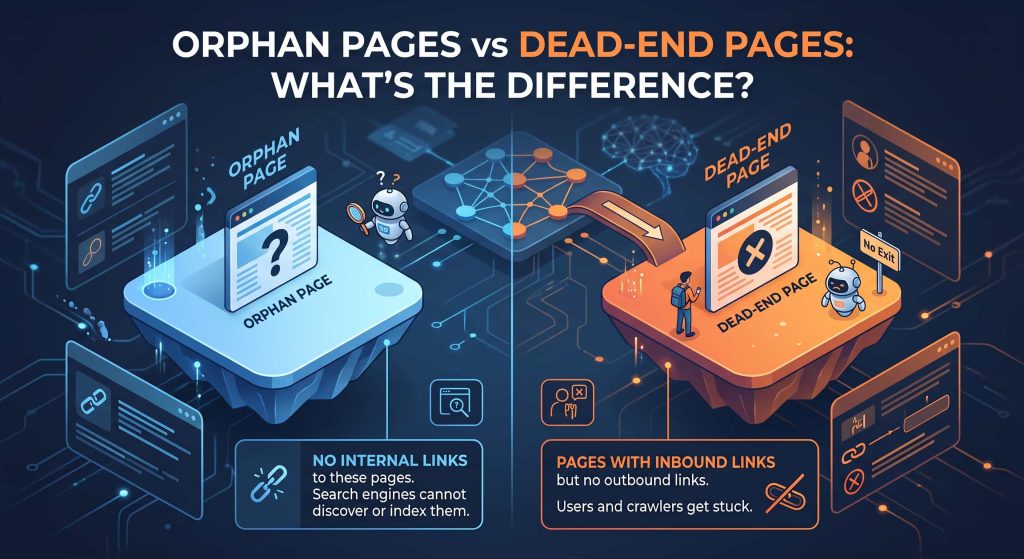
- These two terms are often confused.
- An orphan page has no internal links pointing to it.
- A dead-end page may have internal links pointing to it, but provides no useful internal links leading users onward.
- For example:
- Homepage → Blog → Article
- The article is not necessarily orphaned because the Blog page links to it.
- But if the article contains no useful internal links to related content, it may function as a dead end.
- The problems are related, but they are not identical.
Orphan Pages vs “Discovered – Currently Not Indexed”
- Another common mistake is treating these concepts as the same problem.
- An orphan page describes an aspect of your website’s internal architecture.
- “Discovered – currently not indexed” is an indexing status reported by Google Search Console.
- A page can be orphaned and indexed.
- A page can be orphaned and not indexed.
- A page can also have internal links and still be discovered but not indexed.
- Therefore, don’t use an indexing status as a direct synonym for orphan-page status.
- Instead, investigate the two issues separately and then look for relationships between them.
How to Find Orphan Pages on Ecommerce Websites
Ecommerce websites deserve special attention because their URL structures are often much more complicated Imagine an online store with 50,000 products.
A product may originally be linked from:
Category → Subcategory → Product
After a category restructuring, that path disappears The product remains live, but the internal connection is gone. Now imagine this happening to 2,000 products. You have a potentially significant internal architecture problem. Ecommerce orphan-page audits should therefore consider product categories, discontinued products, out-of-stock products, filters, faceted navigation, pagination, and product relationships. The goal isn’t simply to add links to everything It is to determine which URLs deserve to remain part of the site’s discoverable architecture.
How to Prevent Orphan Pages From Coming Back
Fixing orphan pages once is useful Preventing them from returning is much better The easiest way to do this is to include internal-link validation in major website changes Before launching a redesign, migration, or large content cleanup, compare the old and new URL structures.
If an important page existed before the change, make sure it still has an appropriate internal path afterward. For large websites, regular crawling can also help identify URLs that suddenly lose internal links. Sitemaps should be reviewed as well. If a page is included in the XML sitemap but has no meaningful internal links, that discrepancy deserves investigation.
A Simple Orphan Page Audit Workflow
A practical workflow looks like this:
- Start with a full website crawl in Screaming Frog.
- Then add additional URL sources such as XML sitemaps and Google Search Console.
- Compare the URLs discovered through those sources with URLs discovered through internal crawling.
- Export the potential orphan URLs.
- Then manually analyze their status, indexability, organic performance, backlinks, content quality, search intent, and business value.
- Finally, decide whether each URL should be internally linked, improved, consolidated, redirected, removed, or intentionally left disconnected.
- After making changes, crawl the website again.
This final crawl is important because an SEO audit should not end when you identify a problem. You should verify that the implementation actually changed the website’s structure as intended.
The Bottom Line: An Orphan Page Is a Signal, Not a Verdict
Orphan pages are easy to misunderstand. Finding an orphan page doesn’t automatically mean you have found an SEO error. Instead, it is a signal that a URL may not be properly connected to your website’s internal architecture.
The most valuable part of an orphan-page audit is therefore not the number of URLs you find. It is understanding why those URLs became disconnected and whether they deserve to be reconnected. Tools such as Screaming Frog can make the discovery process much easier by combining crawl data with sources such as XML sitemaps and Google Search Console. But the final decision still requires SEO judgment. If an orphan page has valuable content, organic visibility, backlinks, or commercial importance, adding relevant internal links can give it a stronger place within the website.
If the page has no meaningful purpose, consolidating, redirecting, or removing it may make more sense. The best orphan-page audit is therefore not:
“Find every URL without an internal link.”
It is:
“Find disconnected URLs, understand why they are disconnected, and decide what role each page should play in the website.”
That approach turns a simple technical SEO check into a meaningful website architecture and content-quality exercise.